
Website and App Development for Beginners
Frontend, backend, database and full-stack can sound like four different worlds. This guide shows how they fit together, which technologies belong to each area and where a beginner can start.
Frontend
What the student sees and uses
Backend
Rules, accounts, security and APIs
Database
Students, courses and enrolments
How does a website or app actually work?
Imagine a student portal where you can sign in, view courses and enrol in a batch. The screen you interact with is the frontend. When you click “Enrol,” the backend checks the rules and processes your request. The database stores your account and enrolment.
Student clicks “Enrol”
Backend validates the request
Database saves the enrolment
Frontend shows confirmation
Simple way to remember: frontend presents, backend decides and the database remembers.
Website, web application or mobile application?
These terms overlap, but the following distinction is useful when you are beginning:
| Type | What it mainly does | Example |
|---|---|---|
| Website | Primarily presents information | Institute or portfolio website |
| Web application | Lets users sign in, submit data or complete tasks | Student portal or online store |
| Mobile application | Runs as an app on a phone or tablet | Expense tracker or delivery app |
| Progressive Web App | A web app with installable, app-like features | Installable attendance portal |
A product can fit more than one category. An online store is a website when you browse products and a web application when you sign in, pay or track an order.
What is frontend development?
Frontend development is the part of website and app development concerned with what users see and interact with: layouts, buttons, forms, navigation, animations and responsive screens.
HTML
Creates the structure and meaning of a page.
CSS
Controls layout, colours, spacing and responsiveness.
JavaScript
Adds behaviour, interaction and changing data.
Technologies used in modern frontend development
| Purpose | Common technologies |
|---|---|
| Core foundations | HTML, CSS, JavaScript and TypeScript |
| Styling | Plain CSS, Tailwind CSS and Bootstrap |
| User interfaces | React, Vue, Angular and Svelte |
| Application frameworks | Next.js, Nuxt and SvelteKit |
| Everyday tools | Git, GitHub, browser developer tools, npm and Vite |
| Design and quality | Figma, responsive design, accessibility and testing |
You do not need to learn everything. A strong beginner sequence is HTML → CSS → JavaScript → Git → one framework such as React or Vue. Frameworks make more sense after you understand the language underneath them.
Practical example: On a food-ordering app, the frontend displays restaurants, filters dishes, validates the address form and updates the cart as the customer adds items.
What is backend development?
Backend development powers the work users usually cannot see. It receives requests, applies business rules, protects information and communicates with the database or other services.
Common backend choices
| Language or runtime | Common frameworks | Why students choose it |
|---|---|---|
| JavaScript / TypeScript | Node.js, Express, NestJS | One language can be used across frontend and backend |
| PHP | Laravel | Practical for business applications and widely available hosting |
| Python | Django, FastAPI, Flask | Readable syntax and useful in data and AI work too |
| Java | Spring Boot | Common in large and enterprise applications |
| C# | ASP.NET Core | Strong fit with the Microsoft ecosystem |
| Go | Standard library, Gin | Often used for efficient services and APIs |
The best choice depends on what you want to build, the companies around you and what you can practise consistently. Start with one language and learn requests, responses, APIs, authentication and database access properly.
Continue with the complete backend development guide, or see how NSL teaches backend development through practical applications.
What is a database?
A database stores information in an organised way so an application can find, update and protect it. A college portal may store students, courses, attendance, fees and results.
A simple relational database
Database technologies you will hear about
PostgreSQL, MySQL, SQLite
Organise structured information into related tables. A strong first choice for most beginners.
MongoDB
Stores flexible, document-shaped information. Useful in the right application, but not automatically better than SQL.
Redis
Commonly used for fast temporary data, sessions and caching alongside a main database.
Supabase, Firebase
Provide hosted data and other backend features that can help prototypes move faster.
Beginner recommendation: learn SQL, tables, relationships, primary keys and basic queries before trying several database products.
What is full-stack development?
A full-stack developer can work across the frontend, backend and database of an application. It does not mean knowing every language or being equally expert in every layer. It means being able to understand and build the complete flow.
JavaScript stack
React + Node.js + PostgreSQL
Modern React stack
Next.js + PostgreSQL
PHP stack
Vue or React + Laravel + MySQL
Java stack
React or Angular + Spring Boot + PostgreSQL
Full-stack work also involves Git, HTTP, APIs, authentication, testing, deployment, domains and basic security. These supporting skills are what turn separate pieces of code into a working product.
Where does mobile app development fit?
Mobile apps still need screens, application logic and data. The difference is that their frontend is built for Android or iOS rather than primarily for a web browser. They can often use the same backend and database as a web application.
| Approach | Common technologies |
|---|---|
| Android applications | Kotlin |
| iPhone and iPad applications | Swift |
| Cross-platform applications | Flutter or React Native |
| Installable web experiences | Progressive Web Apps |
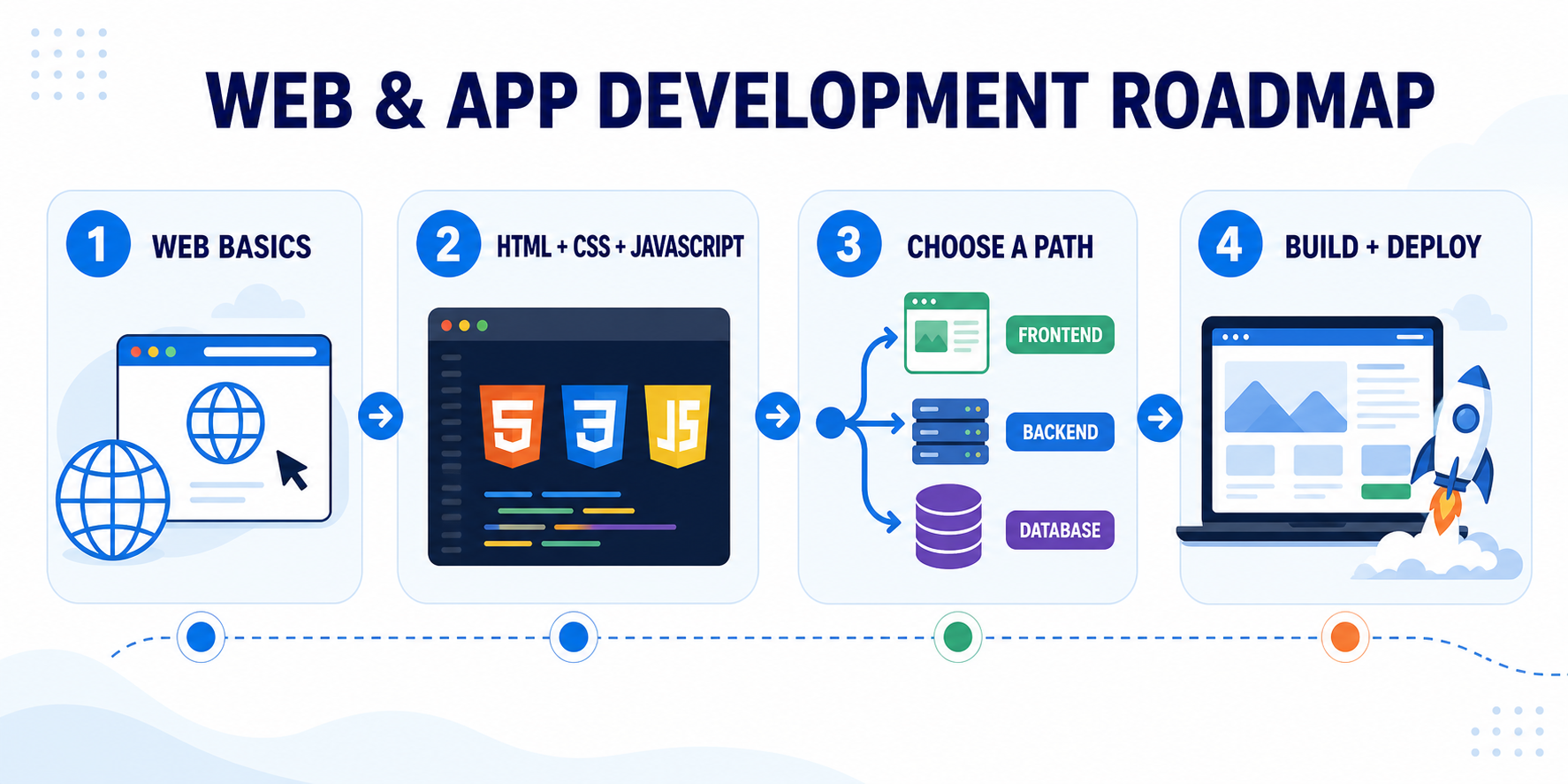
A sensible learning roadmap for beginners
Technology lists can make beginners feel they are already behind. You are not. Learn in layers and build something at every stage.
Understand the web
Learn browsers, servers, URLs, HTTP and how files are organised.
Build the visible layer
Learn HTML, CSS and basic JavaScript. Build a responsive multi-page website.
Choose your direction
Go deeper into a frontend framework, or start one backend language with SQL and APIs.
Build and ship one complete project
Add validation, authentication and a database. Use Git, deploy it and practise explaining your decisions.
Which development path may suit you?
Choose frontend if…
You enjoy visual details, browser interactions and turning designs into usable screens.
Choose backend if…
You enjoy logic, APIs, security, business rules and organising data.
Choose full-stack if…
You want to understand the complete product and are comfortable learning one layer at a time.
Choose mobile if…
You want to create phone-first experiences and work with device features.
Still unsure? Start with HTML, CSS and JavaScript. They provide a visible, beginner-friendly introduction to programming and help you discover which work you enjoy.
Common questions about website and app development
Should I learn React before JavaScript?
No. React uses JavaScript, so variables, functions, arrays, objects, events and asynchronous code should come first. You do not need to master every advanced JavaScript topic before starting React.
Do I need to learn every frontend and backend technology?
No. Learn strong foundations and one coherent stack. It is more valuable to build a complete, understandable project than to collect shallow familiarity with ten frameworks.
Is PHP outdated?
No. PHP continues to power many websites and business applications, while Laravel provides a modern development framework. Whether it is the right first backend depends on your projects and local opportunities.
Is MongoDB better than MySQL or PostgreSQL?
They solve data problems differently. Relational databases are a strong default for structured applications with clear relationships. MongoDB can be useful for document-shaped data. Choose based on the data, not popularity alone.
Can AI build the complete application for me?
AI can explain concepts, draft code and help debug, but you still need to understand the code, verify security, test behaviour and make product decisions. Use it as an assistant rather than a substitute for fundamentals.
Do I need advanced mathematics?
Most general web development needs logical thinking more often than advanced mathematics. Specialised areas such as graphics, machine learning or scientific applications can require more maths.
Not sure which development path to choose?
Tell us what you enjoy, what you already know and the kind of projects or career you want. An NSL mentor can help you choose a practical starting point.
Final-year student? You can also explore NSL’s project and internship guidance.
Next Skill Labs Editorial Team
Practical technology guidance reviewed by NSL trainers.